
The Amplify core services run in Amazon Web Services (AWS) and use several 3rd party services that provide additional functionality.
In this document, we will give a technical overview of the architecture that makes up Amplify.
General Infrastructure
Amplify is a SaaS offering that utilizes the easy scalability of modern cloud solutions. To get the best out of these tools, our services run many clients on the same environments in our AWS setup.
Because the architecture is modular, Amplify supports the ability to split out services which can allow for an isolated setup for any client — and even supports complete replacement of parts of the system, such as the DAM integration or user management provider.
Examples of this modularity are the ability to let databases and file storage exist in a setup where it only contains data from a specific customer. The services can even be owned by the client, as long as they exist in the AWS cloud. This lets the client have complete control over their own content at all times.
Note: Separation of services/data, from other customers, is only available as part of our Enterprise level licenses. This does not change the way data is used with and in 3rd party applications described in our Handling of Data | 3rd party data processers documentation.
Integrations
As a default integration, Amplify uses Cloudinary with a shared solution across all customers. With our Enterprise Licence, we offer the option to use a separate, and even client-owned, Cloudinary setup - as well as integrations to other DAM systems.
Veeva Vault
If the client wished to enable an existing DAM, Amplify offers a connection to Veeva Vault for our Enterprise customers, that uses an existing Vault as DAM for any Amplify-specific content and assets.
Auth0
For authentication and user maintenance, we use Auth0 as a provider, and through their services we can connect all major SSO services, including Vault SSO, for easy access for the whole organisation.
Please view Amplify Authentication for more specific information on this integration.
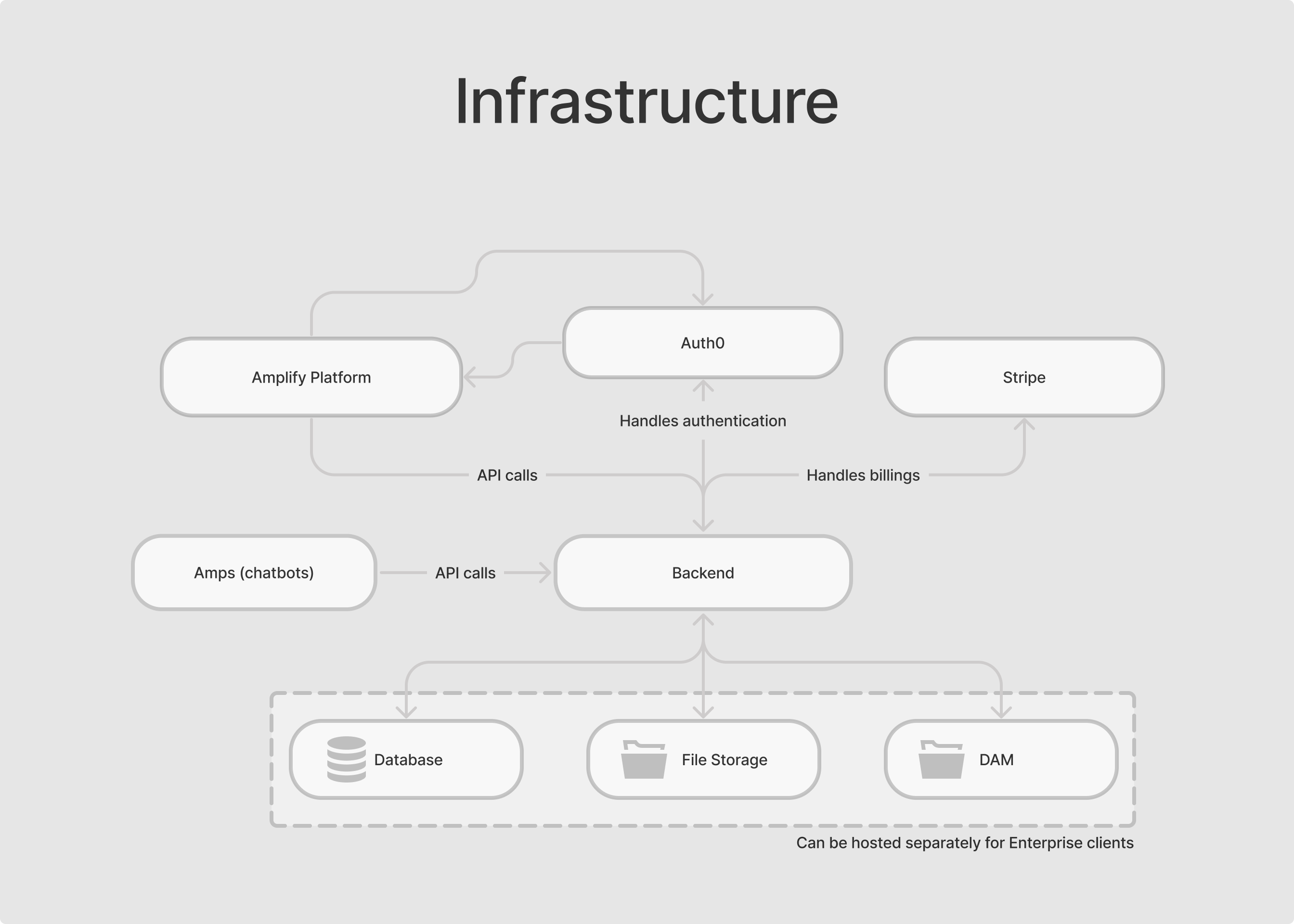
For more advanced requests, e.g., for other DAM systems or storage solutions, the modular setup allows for possible integrations of most 3rd services.
Amplify Platform Content Deployment
Amplify has several ways to publish content to the end users.
Both the self-detailer and the Web Amp require an internet connection as they utilize the APIs provided by the Amplify services.
Self Detailers
Amplify supports an automated self-detail function, which allows users to import existing eDetailers and work with them directly to create a self-guided eDetail experience.
Structure and format
Amplify requires that eDetails follow an outlined structure, which is derived from a baseline of typical eDetails, this ensures an accurate Amplify implementation of a self-detail.
To create a self-detailer, the eDetailer is uploaded using the creation wizard in Amplify. The requirements for import of an eDetail is a zip file containing the necessary HTML/CSS with a file-specific structure of folders and files:
-
Folder or zip for each slide containing:
-
index.html (the name of the file is not important)
-
thumb.png
-
-
Folder or zip containing the code that binds the structure of the eDetailer together
-
Relative paths must be used in all files and references
The self-detailer is hosted in the Amplify AWS environment together with the additional improvements, a Vue Instance, added to the eDetailer when importing to Amplify.
More information can be found here: https://help.amplify.anthill.technology/sup/edetail-formats-for-self-details
Web Amp
An Amp allows the use of Amplify on an existing website.
To add an Amp on a webpage, the deployment steps are used in the Amplify service - this will generate a javascript code snippet that will need to be included on the webpage the Amp will run.
When the snippet is added to the website it is now able to load and display the Amp on the site. This is done by loading javascript, hosted by Amplify in AWS, that is able to render and perform the actions and logic required to run the Amp.
The solution is based on Vue, specifically using Vue Custom Element to avoid interference with the webpage on which it is running.